
Grade Calculator
What is a Grade Calculator?
A Grade Calculator is a free online tool used by students and educators to determine academic grades using entered scores and weights, and it truly simplifies process of calculating current grades during long academic journeys with more ease and precision. From my experience, it helps students estimate impact of each assignment in a course by showing the weighted average grade calculator and overall grade, which depends on two main factors: the grade of each assignment (g) and the corresponding weight (w). With this, you can calculate current average score from completed assignments at the current point of the semester, making performance tracking more easy to understand and clear about where you stand.For quick and simplified scoring without complex weights, students can also use an Easy Grader to instantly convert correct answers into percentages.
This online calculator feature lets you determine score you need on remaining assignments like the final exam to reach your desired grade in the course, while advanced calculations through a Weighted Grade Calculator help compute weighted grades with high precision. This tool helps find current grade in a class by combining assignment scores and weights, shows score you need on future assignments to reach a target grade, and explains how different scores affect overall course grade. As digital tool, it calculates course grade by weight percentage, predict final grade, and helps you strategize how to study for remaining course assignments and exams, eliminates guesswork, lets you see exactly how you’re doing, try what if scenarios, test the score on future assignments and tests, and confidently hit target grade.
How to Use a Grade Calculator?
A Grade Calculator works as a straightforward process where you begin by entering information that reflects academic performance through an online grade calculator. From my experience helping students, the key is to input the current percentage for every assignment, test, or exam along with its respective weight toward the final grade. For any additional assignment, additional test, or additional exam, simply click Add Assignment so the results can automatically update as you input each component and track progress across the course. For specific components like tests or assignments, using a Final Grade Calculator helps to calculate individual scores, convert them into percentages, and keep accuracy consistent across the tool.
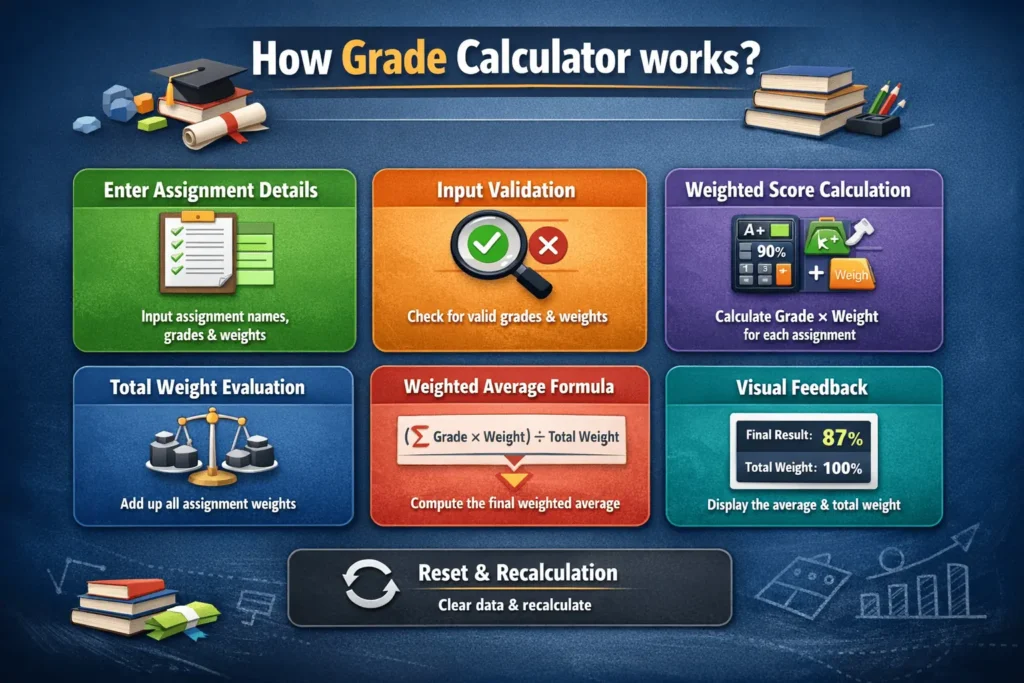
Most of these rely on weighted averages, which is common in high school and college courses where assignments don’t count the same. A clear example of a course grade being calculated is when homework counts 20%, quizzes 10%, the midterm 30%, and the final exam 40%. These course elements each contributes a percentage to the final grade, where the tool multiplies your score in each category by its respective weight, then sums everything to compute the full course grade. If you can follow these steps to calculate your grade using weights or total points, the process stays clear, accurate, and easy to manage.
Step-by-Step Working
- Enter assignment information
The user starts by entering the Assignment Name, Grade (percentage), and Weight for each assessment. The grade represents the score earned, while the weight shows how much that assignment contributes to the final result. Users can add multiple assignments using the Add Assignment button. - Input handling and validation
Every time a grade or weight is entered or changed, the calculator reads the input values and checks whether they are valid numbers. Only assignments with valid grades and weights are included in the calculation. - Weighted grade calculation
For each assignment, the calculator multiplies the grade by its weight. This creates a weighted score, ensuring that assignments with higher weights have a greater impact on the final average. - Total weight calculation
The calculator adds together all the individual weights to find the total weight. This value is important because it defines the scale used to calculate the weighted average. - Final average formula applied
The calculator uses the weighted average formula to compute the final result:
Weighted Average = (Sum of Grade × Weight) ÷ Total Weight
The result is displayed as a percentage, giving a clear picture of overall performance. - Result display and visual feedback
When valid data is available, the calculator shows the average percentage in the result card and updates the label to display the total weight. The card color changes to indicate a successful calculation. - Reset and recalculation
The Reset button clears all entered data and restores the calculator to its default state. Any new input automatically triggers a fresh calculation without reloading the page.
Example Calculation
Weighted Grade Calculator Formula:
| Assignment Name | Grade (%) | Weight | Grade × Weight |
|---|---|---|---|
| Class Test | 70 | 15 | 1050 |
| Homework | 95 | 10 | 950 |
| Project | 88 | 25 | 2200 |
| Midterm Exam | 78 | 20 | 1560 |
| Final Exam | 82 | 30 | 2460 |
| Total | — | 100 | 8220 |
Final Average = Total (Grade × Weight) ÷ Total Weight
Final Average = 8220 ÷ 100 = 82.2%
Grade Conversion Chart
In U.S. schools, a percentage-based grading scale converts classroom performance into letter grades and GPA points. This chart shows commonly used national grade ranges with plus and minus variations, making a Grade Calculator more helpful to understand grading systems commonly used in the USA. Most American schools and colleges rely on a combination of A through F percentage grades and the GPA scale, typically 4.0, giving an overview such as 90-100%, 80-89%, 70-79%, 60-69%, and below 60%. Many institutions apply plus/minus formats like A- and B+, which appear in the table and help align results across different grading scales.
On the GPA side, numeric values such as 4.0 and 3.0 are standard, while weighted systems reward advanced courses like AP and honors, where grades may reach 5.0. As a guide to Convert GPA, Weighted Grades assign assignments and exams different weights based on importance, for example a final exam at 50% and homework at 20%, with a deeper dive found in Guides to Calculate results. Although accepted numeric equivalents vary by school or university and there are no precise rules, this uses the midpoint of each percentage calculator range for calculation of course grades. If your institution follows a different scale, entering a known percentage directly as you input scores ensures accuracy. This general conversion table acts as a guideline across educational systems, while allowing for variations in grading scales.
| Letter Grade | Percentage Range | Midpoint % | GPA (4.0 Scale) |
|---|---|---|---|
| A+ | 97 – 100% | 98.5 | 4.0 |
| A | 93 – 96% | 94.5 | 4.0 |
| A− | 90 – 92% | 91 | 3.7 |
| B+ | 87 – 89% | 88 | 3.3 |
| B | 83 – 86% | 84.5 | 3.0 |
| B− | 80 – 82% | 81 | 2.7 |
| C+ | 77 – 79% | 78 | 2.3 |
| C | 73 – 76% | 74.5 | 2.0 |
| C− | 70 – 72% | 71 | 1.7 |
| D+ | 67 – 69% | 68 | 1.3 |
| D | 63 – 66% | 64.5 | 1.0 |
| D− | 60 – 62% | 61 | 0.7 |
| F | Below 60% | 0 | 0.0 |
Outstanding Features of Grade Calculator
This section highlights the key features that make a grade calculator easy to use, flexible across different grading systems, and reliable for accurately tracking academic performance.
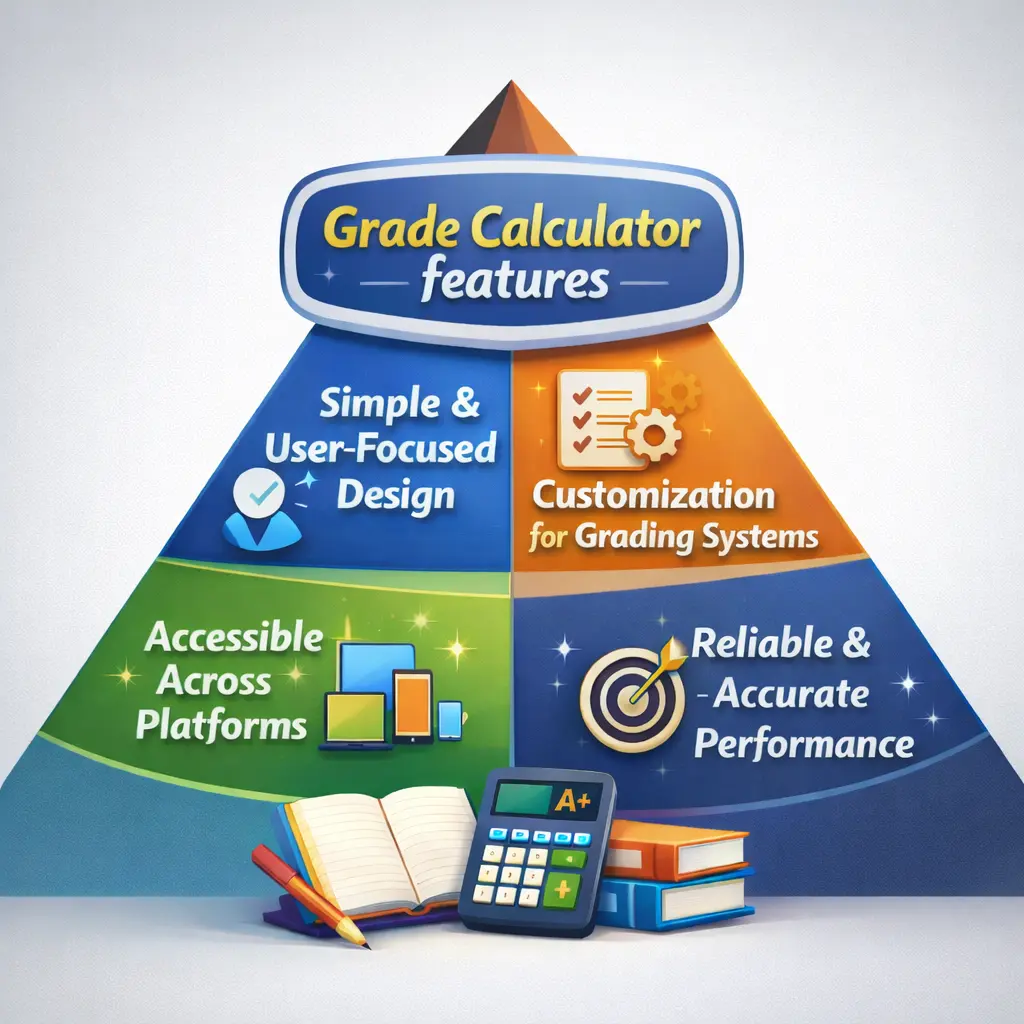
- Simple and User-Focused Design: Using this academic tool is simple and straightforward, even for a first-time user. It is crafted with the user mind, offering noticeable benefits and a smooth learning curve.
- Customization for Different Grading Systems: Recognizing the diversity of grading systems across different educational institutions, the tool provides customization options. Users have flexibility to tailor it to their specific needs, for example, they can add many assignments, adjust weight, and align it with their school unique system.
- Accessible Across Multiple Platforms: The tool is accessible across various platforms to accommodate preferences and different device types. It is available as a web application and mobile app, allowing access conveniently from desktops, laptops, tablets, and smartphones.
- Intuitive and User-Friendly Interface: The user interface is designed intuitive and user-friendly, prioritizing ease of use. Input fields are labeled logically, helping users understand required information easily. The overall design focuses on simplicity, enhancing experience for all users.
- Reliable and Accurate Performance: In sum, the result calculation tool is a trusted tool for students and educators on their academic journeys. Its friendly interface and accurate calculations make it a valuable companion, helping users calculate course grade effectively
Important Role of the Grade Calculator in Academic Path
It helps students and educators understand academic performance clearly. It supports better planning, smarter decisions, and stress-free goal setting by showing where you stand and what you need to improve.
- Scenario Planning & Decision Making
It works as a flexible tool for students and educators, supporting Scenario Planning, strategic decision-making, fostering efficiency, and transparency by helping users understand their average grade. - Impact Analysis on Final Grades
Users can experiment with different scenarios by input hypothetical scores for future assignments and exams to see the impact on the final grade and overall class performance. - Simplified Grading for Teachers
Teachers use these Calculators to streamline grading process by inputting scores and weights to quickly calculate overall grades, saving time and ensuring accuracy. - Goal Setting & Academic Planning
Strong Goal Setting allows users set grade goals and determine scores needed in upcoming assessments to achieve goals, especially for a specific final course grade. - Stress Reduction & Progress Tracking
By knowing current grade and having the ability to plan for future assessments, students can reduce stress and manage semester-long planning using these grading tool.An Average Grade Calculator helps track overall performance by clearly showing the current average score at any point in the semester. - Real-Life Use & GPA Tracking
Through real-life examples in How to Use this in Real Life and Case Studies, students learn how the Grade Calculator provides an average score for a specific course, where the output becomes the input for a GPA calculator to calculate GPA and track overall academic performance with tools like the College GPA Calculator and High School GPA Calculator.
When is a Grade Calculator Most Helpful?
This calculator is most helpful when used throughout a semester or quarter to keep tabs on your performance in a course. In my experience, it becomes especially useful before a big test when you want to know the score you need on the final exam to get an A. By testing different outcomes, the tool lets you understand how each test result impacts your overall standing. These scenarios help students plan smartly instead of guessing.
It is also valuable during mid-semester evaluations, when you are trying to decide whether to drop a class or stick it out and use the calculator to see where you stand. For GPA planning, students aiming to maintain honors, a scholarship, or athletic eligibility can calculate if their current grades will get them there. In a group project strategy, where teamwork includes many people as part of the grade, you can assess how group scores affect individual results, and compensate much if others are underperforming.
Tips to Improve Your Grades
Improving your grades doesn’t require a complete lifestyle change it starts with smart planning, consistent habits, and academic grading tool to understand where you stand and what steps to take next.

- Track Performance & Plan Smartly: Use this grading score calculation system to track current performance and focus on improving grades through strategic effort and practical tips that boost academic success.
- Stay Organized From Day One:
Stay Organized by keep track of assignment due dates, exam schedules, and grading weights to prioritize work effectively and avoid last-minute pressure. - Study Consistently, Not Last Minute:
Review Regularly, study consistently, and avoid cramming before exams to retain information and perform better. - Seek Help Before Grades Slip:
When struggling with a subject, Seek Help Early, ask your teacher for clarification, or use tutoring resources especially if grades are slipping, with support from a guide like What to Do If Your Grades Are Slipping. - Build Habits That Improve Results:
Focus on improving your grade through consistent habits instead of a full lifestyle overhaul, following effective steps that help students change your percentage in a class. - Never Skip Assignments:
Turn in all assignments because small assignments add up a zero can drop your grade dramatically, while partial credit keeps the average stable. - Ask for Direct Feedback:
Ask your teacher what you can improve; an honest conversation often reveals where points are being lost and helps avoid repeating mistakes. - Get Help the Moment You’re Confused:
Get help as soon as something feels confusing with a quick explanation from a teacher, classmate, tutor, or video to save hours of frustration and prevent snowballing gaps. - Review Smart, Not Longer:
Review briefly but consistently even ten minutes of active review using flashcards, practice questions, or teaching it out loud beats cramming and helps retain information longer. - Use Your Grade Calculator Strategically
Use this grade evaluation tool Strategically to input hypothetical scores for upcoming assignments and exams to reach goal grade. - Monitor Grades Weekly
Track your grade weekly, use this grading tool to see where you’re actually standing, know your real number, and adjust early before big assignments or exams hit.
Benefits of Using a Grade Calculator
Using a Grade Calculator provides students and educators with time-saving, accurate, and flexible ways to track grades, set academic goals, and improve performance efficiently.

- Time-Saving & Efficiency:
A Grade Calculator allows you to quickly calculate grades without manual computations, saving time for studying and teaching, and improving overall time management. - Accuracy & Error-Free Results:
As an automated tool, it helps eliminate errors in grade calculations and ensures precise results, reducing mistakes explained in Common Mistakes When Calculating Grades. - Goal Tracking & Progress Monitoring:
Supports Goal Tracking by letting users set academic goals, track progress, and understand the impact of each assignment on the overall grade. - Stress Reduction & Clarity:
Helps students gain clarity about their current standing, understand what you need to achieve, and focus on better academic performance while reducing anxiety. - Flexibility & Scenario Testing:
Offers Flexibility to experiment with different scenarios, testing how future scores can affect final grade, enabling empowering and informed decisions. - Grade Improvement Planning:
Tools like the Grade Improvement Calculator show the scores you need to improve grades and boost performance effectively. - Multi-Subject Performance View:
A course grade calculator extends utility by helping students track progress across multiple subjects, giving a broader view of academic performance and helping identify strengths and weaknesses in different areas. - Smart Study & Academic Strategy:
By visualizing data, students can allocate study time wisely, maintain a balanced approach to education, and build a strong academic strategy through academic planning and performance tracking. - Support for All Academic Levels:
Useful for undergraduate studies, graduate, and post-graduate students, whether managing complex course load or preparing for an upcoming exam, offering valuable insights. - Fast Grade Representation for Teachers & Students:
Provides fast representations and accurate representations of grades, including letter grade or numerical score, using inputting score received, total possible points, and grading scale, helping teachers manage student’s grades, handle large class sizes, streamline grading process, and grade assignments quickly.